
siri Fuchsia Go Keyboard1.0 - Google Play
You'll be able to see results in few seconds.
Publisher Description
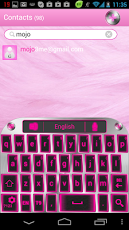
THIS IS A THEME NOT A STAND ALONE APP, READ BOTTOM FOR INSTRUCTIONS, NEED HELP? EMAIL USLike This? Help keep this Theme FREE & WITHOUT Airpush crap, Buy "siri Fuchsia Go Launcher Theme", Your contribution will Help us to keep it free without Ads, Matching Go Contacts, Go Sms Pro Are Free.*OUR FAN PAGE* http://www.facebook.com/mojoandme★ INSTALLING GO KEYBOARD★ (Part 1)1) Download "Go Keyboard" from your phone "play store app"2) Open "Go keyboard" look for it in your menu it has a leaf icon3) Once open you will be given a set of instructions follow it4) Download a go keyboard theme such as "siri Fuchsia GO keyboard"5) Once that is downloaded DONT OPEN DIRECTLY.★ APPLYING GO KEYBOARD THEME★ (Part 2)1) Open a browser so that your keyboard is displayed (Go keyboard should be active)2) On your keyboard Press (HOLD DOWN) button (#123) a new screen will pop up3) Choose theme setting < Choose select theme < Choose your theme from list done!.Keywords: GO Keyboard GO Launcher Dev Team GO Contact go contact Galaxy neon blue Glass Sphere Ball bubble Orb Heart Carbon Silver silver Black black Blue blue Pink pink Red red Green green Yellow yellow Orange orange White white Galaxy Nebula Nova Super Universe Halloween iOS iPhone Theme Mojo Studio mac apple tablet tablets; color carbon fiber;
About siri Fuchsia Go Keyboard
The company that develops siri Fuchsia Go Keyboard is Mojo Studio. The latest version released by its developer is 1.0.
To install siri Fuchsia Go Keyboard on your Android device, just click the green Continue To App button above to start the installation process. The app is listed on our website since 2013-06-18 and was downloaded 0 times. We have already checked if the download link is safe, however for your own protection we recommend that you scan the downloaded app with your antivirus. Your antivirus may detect the siri Fuchsia Go Keyboard as malware if the download link to com.jb.gokeyboard.theme.siriFgk is broken.
How to install siri Fuchsia Go Keyboard on your Android device:
- Click on the Continue To App button on our website. This will redirect you to Google Play.
- Once the siri Fuchsia Go Keyboard is shown in the Google Play listing of your Android device, you can start its download and installation. Tap on the Install button located below the search bar and to the right of the app icon.
- A pop-up window with the permissions required by siri Fuchsia Go Keyboard will be shown. Click on Accept to continue the process.
- siri Fuchsia Go Keyboard will be downloaded onto your device, displaying a progress. Once the download completes, the installation will start and you'll get a notification after the installation is finished.
Program Details
System requirements
Download information
Pricing
Version History
version 1.0
posted on 2013-06-18
version 1.0
posted on 2013-06-18
Several fixes and updates
Disclaimer
Official Google Play Link
We do not host siri Fuchsia Go Keyboard on our servers. We did not scan it for viruses, adware, spyware or other type of malware. This app is hosted by Google and passed their terms and conditions to be listed there. We recommend caution when installing it.
The Google Play link for siri Fuchsia Go Keyboard is provided to you by apps112.com without any warranties, representations or guarantees of any kind, so access it at your own risk.
If you have questions regarding this particular app contact the publisher directly. For questions about the functionalities of apps112.com contact us.
